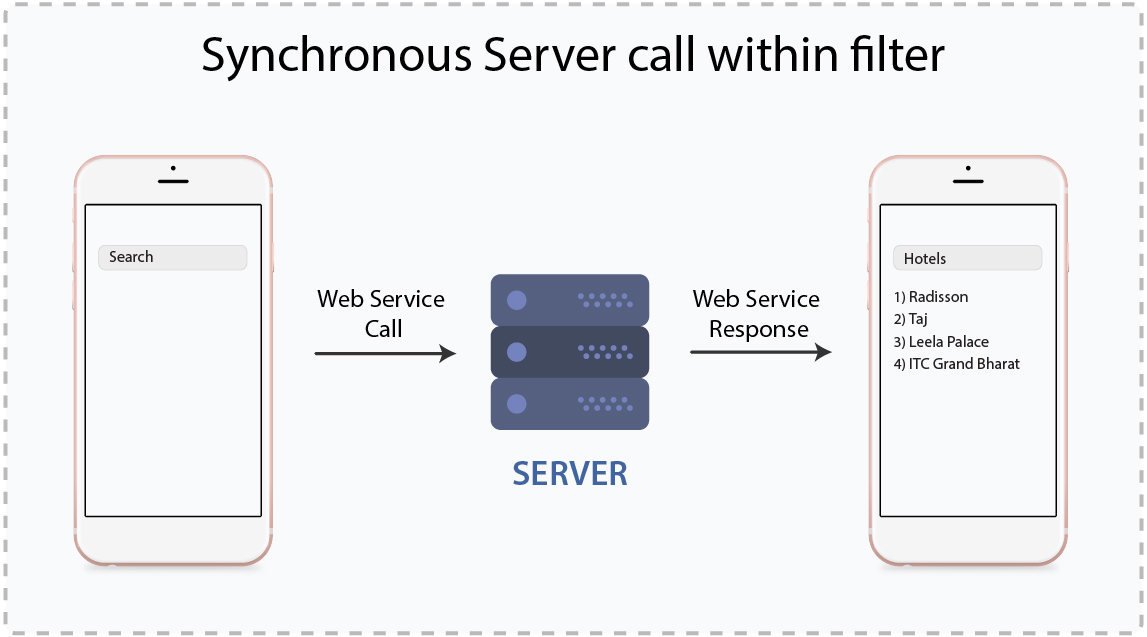
In order to implement synchronous server calling within filter, autocomplete textview is being used. Web service is hit with each character typed in Autocomplete list. For having data dynamically in the list, we can make customized adapter. I have implemented it by making this adapter to implement filterable interface.
For getting data from server, two approaches can be used:
1) Using volley library:
@Override
public Filter getFilter() {
Filter filter = new Filter() {
@Override
protected FilterResults performFiltering(CharSequence constraint){
final FilterResults filterResults = new FilterResults();
if (constraint != null) {
JsonObjectRequest jsonObjectRequest = new JsonObjectRequest(Request.Method.GET,url,null,new com.android.volley.Response.Listener()
{
@Override
public void onResponse(JSONObject response) {
ResponseData responseData = new Gson().fromJson(response.toString(),ResponseData.class);
if(responseData != null){
filterResults.values = responseData.getResponseData();
filterResults.count = responseData.getResponseData().size();
}}},new com.android.volley.Response.ErrorListener() {
@Override
public void onErrorResponse(VolleyError error) {
}
}) {
@Override
public Map getHeaders() throws AuthFailureError {
return getCustomHeaders();
}};
}
return filterResults;
}
Volley request can be made inside the performFiltering() function which gets callback after each character is typed. But the problem in this approach is due to asynchronous request , different thread is started and before getting any result, the execution of performFiltering() function stops. So we don’t receive result from server and before that publishResults() function is called to display the result to UI.
2) Using Async Task:
@Override
public Filter getFilter() {
Filter filter = new Filter() {
@Override
protected FilterResults performFiltering(CharSequence constraint) {
final FilterResults filterResults = new FilterResults();
if (constraint != null) {
Object obj = WebServiceManager.callWebService();
ResponseData responseData = new Gson().fromJson(obj.toString(),ResponseData.class);
if(responseData != null) {
filterResults.values = responseData.getResponseData();
filterResults.count = responseData.getResponseData().size();
}}
return filterResults;
}
@Override
protected void publishResults(CharSequence constraint, FilterResults results) {
if (results != null && results.count > 0) {
resultList = (List) results.values;
notifyDataSetChanged();
} else {
notifyDataSetInvalidated();
}}};
return filter;
}
In WebServiceManager :
private static Object requestServer(String urlStr) {
HttpURLConnection httpURLConnection = null;
Object response = null;
InputStream inputStream;
int ch;
try{
URL url = new URL(urlStr);
httpURLConnection = (HttpURLConnection) url.openConnection();
httpURLConnection.setConnectTimeout( 3000 * 10000); //Timeout until a connection is established
httpURLConnection.setReadTimeout(3000 * 10000); //Timeout for waiting for data to come
httpURLConnection.setRequestMethod("POST");
httpURLConnection.setRequestProperty("Content-Type", "application/json");
httpURLConnection.setDoInput(true);
httpURLConnection.connect();
inputStream = new BufferedInputStream( httpURLConnection.getInputStream());
StringBuffer stringBuffer = new StringBuffer();
while ((ch = inputStream.read()) != -1) {
stringBuffer.append((char) ch);
}
response = stringBuffer.toString();
}
catch (Exception exception) {
exception.printStackTrace();
}
finally {
httpURLConnection.disconnect();
}
return response;
}
Being synchronous call, call is made to server and the results are obtained before performFiltering() function stops executing. So the autocomplete list is obtained.