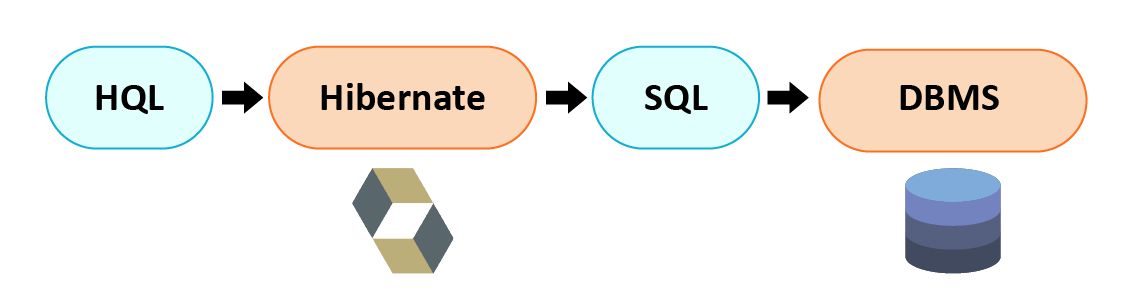
In this tutorial will discuss about Hibernate Query Language. HQL is an object-oriented query language. Hibernate Query Language(HQL) is same as Structured Query language(SQL), except that in HQL we use entity class name instead of table name.
HQL provides its own syntax and grammar
Ex. From Employee emp .
Where Employee is an entity class which are associate with employee table and emp is alias name of Employee class.
It is alternative of SQL query Select* from employe .
All hibernate query are translated by hibernate in to structured query for further processing. Hibernate also provide a way to use structured query in hibernate. HQL syntax is not case sensitive but class name and variables name are case sensitive.
Query Interface: It is n object-oriented representation of a Hibernate query. We can get Query instance by Session.createQuery().
This interface provide the various method :
- public int executeUpdate() – Execute the update or delete statement.
- public String getNamedParameters() – It return the names of all named parameters of the query.
- public String[] getQueryString() – Get the query string.
- public List list() – It return the query results as a List.
- public Query setMaxResults(int maxResults) – It is used to set the maximum number of rows to retrieve.
- public Object uniqueResult() – It is used to return a single instance that matches the query, or null if the query returns no results.
Let’s take a look of CRUD operations using HQL.
1. Select Query: Retrieve an employee detail where employee id is 255.
Query query = session.createQuery("From Employee where employeeId= :id ");
query.setParameter("id", "255");
List list = query.list();
- Update Query : Update Employee name where id is 255.
Query query = session.createQuery("Update Employee set employeeName =:eName" +  " where employeeId= :id");
query.setParameter("employeeName ", "AKASH");
query.setParameter("id", "255");
int result = query.executeUpdate();
3.DELETE Query: Delete employee where id is 255
Query query = session.createQuery("Delete Employee where employeeName = :id");
query.setParameter(":id", "255");
int result = query.executeUpdate();
- Insert Query : In HQL , we can only insert values from another table.
Query query = session.createQuery("insert into Employee (employee_code, employee_name)" +"select employee_code, employee_name from employee_info");
int result = query.executeUpdate();
Note: The query.executeUpdate() will return how many number of record has been inserted, updated or deleted.