
Software development involves more than writing code. Teams first define what to build, understand user needs, estimate costs, plan testing, and decide how the software will be maintained after launch.
That’s where the Software Development Life Cycle (SDLC) comes in. An SDLC gives development teams a clear path to follow—from planning and gathering requirements to designing, coding, testing, deploying, and maintaining software. It helps teams stay organized, manage risks, catch problems early, and keep everyone working toward the same goal.
But here’s the thing: not every software project is the same, so there isn’t one SDLC model that works for everyone. A project with fixed requirements and strict compliance needs may benefit from a very different approach than a fast-moving mobile app where requirements change frequently based on user feedback.
That’s why there are several SDLC models to choose from. Waterfall, Agile, Iterative, Incremental, Spiral, V-Model, Prototype, RAD, Big Bang, and DevOps each offer a different way to plan and manage software development.
In this guide, we’ll break down these 10 SDLC models, look at how each one works, explore their pros and cons, and explain when they make the most sense. We’ll also compare them side by side so you can make a more informed decision based on your project’s requirements, complexity, risks, timeline, and development goals.
Key Takeaways
- SDLC provides a clear roadmap for planning, developing, testing, deploying, and maintaining software while keeping teams aligned throughout the project lifecycle.
- A structured development process helps improve software quality, control development costs, manage risks, and prevent expensive problems from appearing late in development.
- The seven common phases cover planning, requirements, design, development, testing, deployment, and maintenance, creating a repeatable approach to software development.
- No single SDLC model fits every project; the right approach depends on requirements, complexity, risks, available resources, stakeholder involvement, and project timelines.
- Waterfall works well when requirements are stable and predictable, while Agile is better suited to projects where priorities and requirements change frequently.
- Iterative and Incremental approaches help teams deliver software progressively, making them useful when projects need early functionality or gradual feature releases.
- Spiral places a strong emphasis on identifying and managing risks, making it useful for large, complex projects where failures can have serious consequences.
- Prototype and RAD approaches emphasize early versions, user feedback, and faster development, helping teams clarify requirements before investing heavily in the final product.
- DevOps brings development and operations closer together through automation and continuous delivery, supporting frequent releases and ongoing software improvements.
- Choosing a development model requires looking at requirements, project size, stakeholder involvement, risk, delivery expectations, and how frequently the software needs updates.
What is the Software Development Life Cycle (SDLC)?
The Software Development Life Cycle (SDLC) is a structured, step-by-step framework used by engineering teams to plan, design, develop, test, deploy, and maintain high-quality software. Its primary goal is to deliver secure, efficient software that meets customer expectations while managing time, cost, quality, and project risks.
A well-defined development process also gives teams a consistent way to move from an initial idea to a production-ready application. For organizations looking to strengthen their technical capabilities, software engineering services can support everything from software architecture and development to testing, deployment, and ongoing maintenance.
Key Benefits of Following a Structured Development Process
Following a structured software development process gives teams a systematic roadmap for planning, building, testing, and maintaining software. Moving away from ad hoc coding to a standardized approach can improve project visibility, predictability, and overall software quality.
Core Benefits
Higher Software Quality: Because checkpoints, systematic testing, and validation are built into different phases rather than left until the end, teams can identify and resolve defects earlier. This helps prevent small issues from turning into larger problems.
Lower Costs and Less Rework: Thorough requirements gathering can reduce misunderstandings and limit expensive late-stage changes, helping teams make better use of development budgets and resources.
Stronger Risk Management: Teams can identify technical, operational, security, and business risks earlier instead of reacting to major issues after development is already underway.
Clearer Visibility and Transparency: Defined milestones and deliverables help stakeholders, developers, project managers, and QA teams stay aligned on progress, responsibilities, and expectations.
Better Resource and Project Management: Breaking a large project into manageable phases makes it easier to allocate resources, track deadlines, manage scope, and monitor progress.
Valuable Knowledge Assets: Documentation such as requirements, architecture diagrams, design specifications, and test records creates a useful knowledge base for future maintenance, troubleshooting, and developer onboarding.
For organizations exploring broader approaches to building and scaling engineering capabilities, understanding current software development trends can also help teams evaluate how modern practices are changing the development process.
Essential Phases of the Software Development Life Cycle
The Software Development Life Cycle provides a structured framework for taking software from an initial concept through development, release, and ongoing improvement. By following a repeatable process, organizations can better manage project risks, control costs, and align technical work with business objectives.
While terminology can vary across methodologies such as Agile, DevOps, and Waterfall, the traditional framework is commonly described through seven essential phases.
1. Planning and Feasibility Analysis
The project begins by establishing its scope, goals, expected outcomes, budget, and resource requirements. Stakeholders evaluate whether the proposed solution is technically, financially, and operationally feasible.
Key tasks: Cost estimation, risk identification, timeline creation, resource planning, and feasibility analysis.
Primary output: Feasibility study and initial project plan.
2. Requirements Specification
Business analysts, product owners, developers, and other stakeholders identify what the software needs to accomplish. Teams consider user expectations, business objectives, compliance requirements, and integration needs.
Key tasks: Stakeholder interviews, defining functional requirements, documenting non-functional requirements such as security, scalability, and performance.
Primary output: Software Requirements Specification (SRS) or equivalent requirements documentation.
3. System Design
Architects and engineers transform the requirements into a technical blueprint for the software.
Key tasks: Designing system architecture, database schemas, APIs, integrations, infrastructure, security controls, and UI/UX specifications.
Primary output: Detailed system and software design documentation.
4. Development
Engineers begin implementing the software based on the approved requirements and design specifications. Modern development teams commonly use source control, automated builds, code reviews, and continuous integration during this stage.
Key tasks: Backend development, frontend implementation, database development, API integration, code reviews, and unit testing.
Primary output: Functional software components and build artifacts.
5. Testing
The software is systematically evaluated to identify defects, security issues, performance problems, and functionality gaps before release.
Key tasks: Integration testing, system testing, regression testing, performance testing, security testing, and User Acceptance Testing (UAT).
Teams may also encounter challenges around test environments, test data, automation, and performance bottlenecks. Understanding common performance testing challenges and how to overcome them can help teams build a more effective testing strategy.
Primary output: Test results, defect reports, fixes, and quality metrics.
6. Deployment
Once the software has been validated and approved for release, it is moved into the production environment where users can access it.
Key tasks: Production environment setup, data migration, configuration management, release management, monitoring, and user onboarding.
Primary output: Production-ready software release.
7. Maintenance
After launch, the development process continues. Real-world usage can reveal bugs, performance issues, security vulnerabilities, and new user needs.
Key tasks: Performance monitoring, bug fixes, security patches, infrastructure updates, feature enhancements, and ongoing optimization.
Primary output: Software updates, patches, improvements, and new releases.
10 Common SDLC Models
Software development models provide different ways to organize planning, development, testing, deployment, and maintenance. Choosing the right approach depends on factors such as project complexity, requirements stability, risk, team structure, stakeholder involvement, and delivery timelines.
Here’s a quick comparison of 10 commonly discussed models:
| Serial No. | Model | Core Approach | Primary Strengths | Best Suited For |
| 1 | Waterfall | Linear and sequential | Simple to manage; predictable process | Projects with stable, well-defined requirements |
| 2 | Agile | Iterative and incremental | Flexible; continuous feedback | Projects with changing requirements |
| 3 | Iterative | Cyclic improvement | Early versions; continuous refinement | Complex applications with evolving details |
| 4 | Incremental | Staged delivery | Early functionality; modular releases | Projects that can be divided into independent components |
| 5 | Spiral | Risk-driven iteration | Strong risk analysis | Large, complex, high-risk projects |
| 6 | V-Model | Verification and validation | Strong testing discipline | Regulated and safety-critical systems |
| 7 | Prototype | Early model or mockup | Clarifies requirements and user expectations | Projects with unclear or evolving requirements |
| 8 | RAD | Rapid development and prototyping | Fast development and feedback | Projects with short delivery timelines |
| 9 | Big Bang | Minimal formal planning | Flexible and lightweight | Small experiments and exploratory projects |
| 10 | DevOps | Continuous development and operations | Automation and frequent releases | Cloud, SaaS, and continuously updated applications |
Here is a closer look at each approach, including how it works, its advantages and limitations, and the situations where teams commonly consider it.
1. Waterfall Model
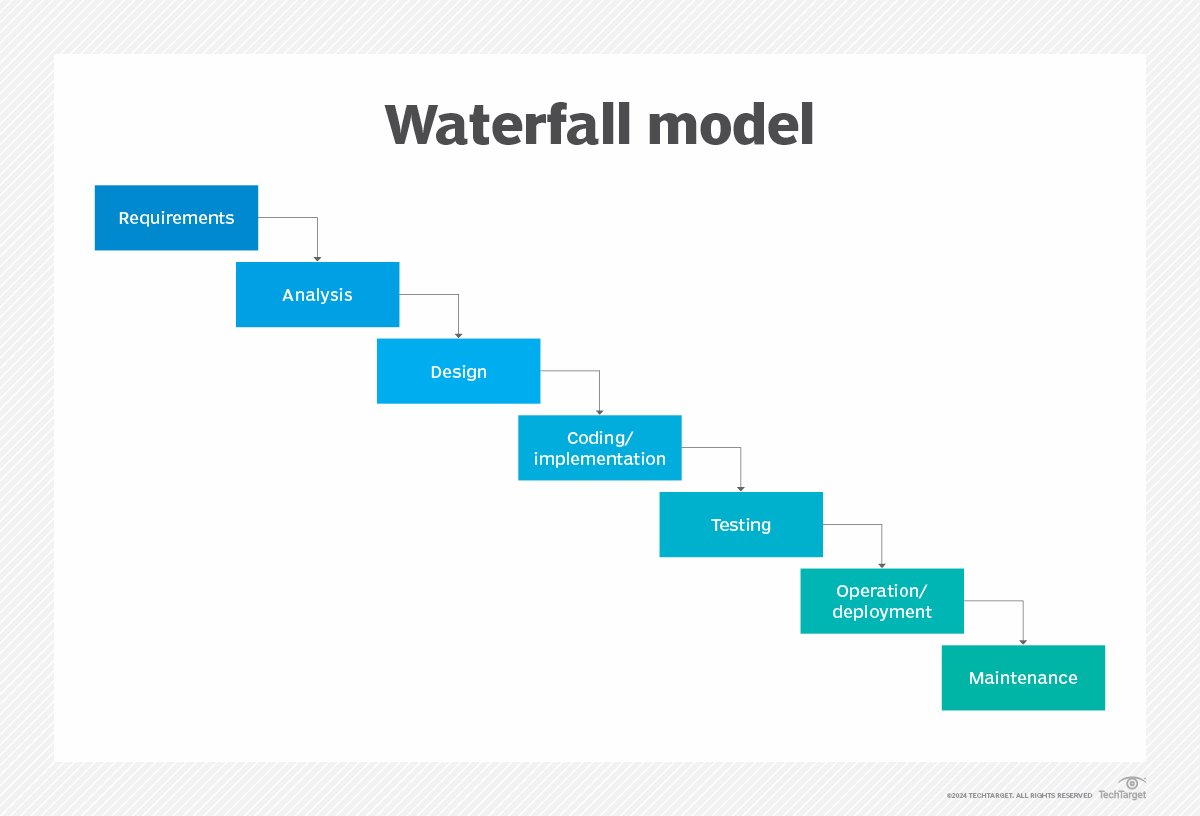
The Waterfall Model is one of the most traditional approaches to software development. It follows a linear, sequential process where development moves through defined stages such as requirements, design, implementation, testing, deployment, and maintenance.
How it works: Each phase is generally completed before the next one begins. Changes later in the process can require significant rework because earlier decisions and documentation are already established.
Pros: Waterfall is relatively straightforward to plan and manage when requirements are stable. It also provides clear documentation, milestones, and deliverables.
Cons: Its sequential structure makes it less adaptable when requirements change. Problems discovered late in the project can also be more expensive to address.
Best for: Projects with well-defined requirements, established technologies, and limited expected changes.
2. Agile Model
The Agile Model focuses on iterative development, collaboration, continuous feedback, and the ability to adapt to changing requirements.
How it works: Work is divided into smaller iterations, often called sprints. Teams develop, test, and review working software throughout the project rather than waiting until the end for a complete release.
Pros: Agile allows teams to respond to changing priorities, incorporate user feedback, and deliver usable functionality earlier.
Cons: It requires strong communication, active stakeholder participation, and effective prioritization. Without good scope management, changing requirements can make projects harder to control.
Best for: Mobile applications, e-commerce platforms, SaaS products, and other projects where requirements can change based on customer or market feedback.
Agile and DevOps have also become closely connected with modern software engineering practices. Gartner discusses Agile and DevOps as important elements of contemporary software engineering approaches.
3. Iterative Model
The Iterative Model focuses on developing software through repeated cycles. Instead of attempting to perfect the entire system in one pass, teams create an initial version and progressively refine it.
How it works: The team develops a basic version, evaluates it, gathers feedback, and then improves the system during subsequent iterations.
Pros: Teams can identify issues earlier, validate ideas sooner, and gradually improve the product.
Cons: The approach requires careful architecture and planning. Poor decisions early in the project can create problems as the system becomes more complex.
Best for: Large or complex applications where requirements are expected to evolve as development progresses.
4. Incremental Model
The Incremental Model divides the overall product into smaller functional components that can be developed and delivered separately.
How it works: Requirements are divided into modules or increments. Each increment is developed, tested, and integrated into the existing product.
For example, an application might initially deliver account management, followed by payments, reporting, messaging, and other capabilities.
Pros: Users can receive useful functionality earlier, while teams can spread development and deployment across multiple releases.
Cons: Integrating multiple components can become complicated without strong architecture and planning.
Best for: Modular applications, enterprise software, and projects where functionality can be released in stages.
5. Spiral Model
The Spiral Model combines iterative development with a strong focus on identifying and managing project risks. Each cycle involves planning, risk analysis, engineering, and evaluation.
How it works: Teams repeatedly move through the spiral, analyzing major risks and validating technical or business assumptions before progressing further.
Pros: It provides a structured way to address significant technical and project risks throughout development.
Cons: It can require more time, expertise, and resources than simpler approaches, making it less practical for small projects.
Best for: Large, complex, and high-risk systems where identifying potential problems early is particularly important.
For a deeper comparison of these two approaches, see Waterfall Model vs. Spiral Model.
6. V-Model
The V-Model is a structured development approach that emphasizes verification and validation. It is closely related to the Waterfall approach but places greater emphasis on planning corresponding testing activities alongside development activities.
How it works: Development activities on one side of the model are paired with related testing activities on the other. For example, requirements definition is connected with acceptance testing, while system design is connected with system testing.
Pros: It encourages early test planning, traceability, and systematic validation.
Cons: Like other sequential approaches, it can be difficult to adapt when requirements change significantly after the project begins.
Best for: Systems where quality assurance, traceability, documentation, and compliance are major considerations.
7. Prototype Model
The Prototype Model involves creating an early representation of the proposed software before building the complete product.
How it works: Developers and designers create a basic prototype that allows stakeholders or users to interact with the proposed functionality and provide feedback. The prototype may then be refined or discarded before full development begins.
Pros: Prototyping can clarify requirements, uncover usability issues, and improve communication between technical teams and stakeholders.
Cons: Stakeholders may mistake a prototype for production-ready software, while overly detailed prototypes can consume unnecessary time and resources.
Best for: Products with uncertain requirements, complex user interfaces, or new concepts that need early user validation.
8. RAD Model
Rapid Application Development (RAD) focuses on shortening development timelines through rapid prototyping, user feedback, reusable components, and development tools.
How it works: Teams work on functional components quickly, gather feedback, and refine the application through multiple development cycles.
Pros: RAD can shorten development timelines and help teams incorporate user feedback earlier.
Cons: It requires experienced developers, active stakeholder participation, and a project that can be divided into manageable components.
Best for: Business applications and projects with relatively short delivery timelines and well-defined, modular functionality.
9. Big Bang Model
The Big Bang Model takes a highly informal approach to software development, with little emphasis on formal planning, documentation, or predefined development stages.
How it works: Developers begin building the software with minimal upfront planning. Requirements and implementation details may evolve during development.
Pros: It involves very little process overhead and can work for small experiments or proof-of-concept projects.
Cons: The lack of planning makes outcomes difficult to predict and increases the potential for technical and project management problems as scope grows.
Best for: Small experiments, academic projects, prototypes, hackathons, and exploratory development.
10. DevOps Model
DevOps brings software development and IT operations closer together, emphasizing collaboration, automation, continuous integration, continuous delivery, monitoring, and ongoing improvement.
How it works: Automated CI/CD pipelines can build, test, and deploy code changes repeatedly. Monitoring and production feedback can then inform future development work.
DORA’s research emphasizes that software delivery performance should be evaluated through both speed and stability, rather than treating them as a trade-off. Its five delivery metrics help teams understand how quickly and reliably they can move changes into production and recover when issues occur.
Pros: DevOps can support faster releases, greater deployment consistency, automation, and closer collaboration between development and operations teams.
Cons: Successful adoption can require changes to organizational culture, processes, tooling, infrastructure, and team responsibilities.
Best for: Cloud applications, SaaS platforms, web applications, and products that require frequent updates and automated deployment processes.
For organizations evaluating the people and processes needed to support these practices, this guide to building an effective software development team provides additional context.
SDLC Models Comparison: Which One Should You Choose?
Choosing a development model can influence how a team handles requirements, planning, testing, releases, changes, and risk. There is no single approach that works equally well for every project.
Instead of focusing only on the model’s name, consider four key factors:
- Requirement clarity: Are the requirements clearly defined, or are they likely to change?
- Project scale: Is the project small and straightforward or large and highly complex?
- Risk level: What happens if technical or business assumptions turn out to be wrong?
- Time to market: Does the product need to be released gradually or delivered on a specific date?
Decision Matrix: Matching Projects to Development Models
| If Your Project Has… | Primary Challenge | Model to Consider | Why It Fits |
| Fixed requirements and strict compliance requirements | Managing changes and maintaining documentation | Waterfall or V-Model | Provides a structured and traceable development process |
| Frequently changing requirements | Responding to shifting priorities and user feedback | Agile | Supports short development cycles and continuous feedback |
| High technical complexity or significant project risk | Identifying and addressing risks early | Spiral | Builds risk analysis into repeated development cycles |
| Modular functionality and staged releases | Delivering useful functionality incrementally | Incremental | Allows capabilities to be developed and released in stages |
| Evolving requirements and a need for continuous refinement | Learning and improving throughout development | Iterative | Supports repeated development and refinement |
| Tight delivery timelines | Building functional software quickly | RAD | Emphasizes rapid prototyping and feedback |
| Unclear user needs or interface requirements | Validating the product concept | Prototype | Gives stakeholders something tangible to review early |
| Continuous deployment requirements | Automating development and operations | DevOps | Supports CI/CD, automation, monitoring, and frequent releases |
| Small experimental project | Keeping process overhead low | Big Bang | Requires minimal formal planning |
Step-by-Step Guide to Choosing a Development Model
Still unsure which approach makes sense? Start by answering these four questions.
How Stable Are the Requirements?
Mostly fixed: Waterfall or V-Model may provide the structure your team needs.
Likely to change: Agile, Iterative, or Prototype approaches may provide greater flexibility.
What is the Project’s Scale and Complexity?
Small and straightforward: Waterfall or a lightweight approach may be sufficient.
Large and modular: Incremental or Iterative approaches can help break the work into manageable pieces.
Large and high-risk: Spiral may be considered when systematic risk analysis is a major requirement.
How Involved are Your Clients or End Users?
Limited involvement: A more structured approach with defined requirements and formal approvals may be easier to manage.
Frequent collaboration: Agile or Prototype approaches can make it easier to gather and incorporate ongoing feedback.
How Will the Software Be Released?
Single major release: Waterfall or V-Model may align with a more sequential delivery structure.
Staged releases: Incremental development can support gradual feature delivery.
Frequent automated releases: DevOps practices can support continuous integration and delivery.
Frequently Asked Questions About SDLC Models
-
Which SDLC model is considered the best?
There is no single model that is best for every software project. The right choice depends on factors such as requirements, project complexity, risk, budget, timeline, stakeholder involvement, and release strategy.
-
How Do I Choose Between Waterfall and Agile?
The choice largely depends on how predictable the project requirements are.
Consider Waterfall when: Requirements are well-defined, technology is familiar, and major changes are unlikely.
Consider Agile when: Requirements are expected to evolve, regular feedback is important, and the team needs to adjust priorities throughout development.
-
Can You Mix Different SDLC Models?
Yes. Organizations often combine practices from multiple development approaches. This is commonly referred to as a hybrid approach.
For example, a team may use a more structured process for architecture and compliance while using Agile iterations for application development.
Hybrid approaches can be particularly useful when different parts of a project have different requirements, risks, or delivery schedules.
-
What Is the Difference Between Iterative and Incremental Models?
Although the terms are sometimes used together, they emphasize different aspects of development.
Incremental: The product is built and delivered in separate functional pieces. For example, a team might release account management first, followed by payments and then messaging.
Iterative: The product is progressively refined through repeated development cycles. Each iteration improves functionality, design, performance, or other aspects of the existing system.
-
Which Model Focuses Most on Risk Management?
The Spiral Model is specifically designed around repeated risk analysis and mitigation. It can be useful for projects where technical uncertainty, complexity, or the consequences of failure make risk management a major concern.
Other approaches can also incorporate risk management through practices such as continuous testing, automated deployments, prototypes, code reviews, and incremental delivery.
The Endnote
Choosing an SDLC model isn’t about finding one approach that’s perfect for every project. It’s about finding a development process that matches the software you’re actually trying to build.
If your requirements are stable and predictability is important, Waterfall or the V-Model may provide the structure you need. If requirements are likely to change, Agile or Iterative development can make it easier to adapt. For projects where risk and uncertainty are major concerns, the Spiral Model puts risk analysis at the center of development. And if you’re building a modern cloud or SaaS product that needs frequent releases, DevOps practices can help connect development and operations through automation and continuous delivery.
The important thing is to look beyond the name of the model. Consider how stable your requirements are, how complex the project is, what risks you’re dealing with, how involved your stakeholders will be, and how frequently users need new functionality.
You also don’t necessarily have to use one approach from start to finish. Many organizations combine practices from different models to create a development process that fits their teams, technology, customers, and business goals.
A development model can’t guarantee that a project will succeed. But choosing an approach that fits your project’s needs can give your team a clearer way to plan, build, test, release, and improve software while keeping costs, risks, and changing requirements under control.
If you’re evaluating how to structure or scale your software development capabilities, exploring software development outsourcing can also provide a useful perspective on team models, delivery strategies, and access to specialized engineering talent.
For organizations looking for end-to-end development expertise, software development services can support projects across planning, design, development, testing, deployment, and maintenance.